Ocr Inspection is the automated checking of text on products, labels, documents, or packaging. A camera captures an image, and optical character recognition software converts visible letters and numbers into digital text. Inspection software then compares that text with approved information, such as a product code, date, or batch number. A clear result can help teams spot errors before items move farther along a line.
In a typical setup, a sensor triggers the camera as an item passes. The system adjusts the image, finds text regions, and reads the characters. It checks the reading against set rules, such as an expected format or value. If a label shows “Batch 4821” but the production record expects “Batch 4827,” the system can flag the mismatch. It may also detect missing, blurred, shifted, or poorly printed text. That is the practical value: not just reading, but checking.
Performance depends on the image and the setup. Glare, curved surfaces, tiny fonts, and uneven lighting can confuse recognition. A camera angle that works for a flat carton may fail on a rounded bottle. Teams usually test real samples, tune lighting and focus, and review uncertain results. Human review still matters. OCR can misread a character, and a confident-looking result is not always correct. That limitation deserves attention. When configured and monitored carefully, Ocr Inspection can support more consistent quality checks and provide readable records of what the system inspected.
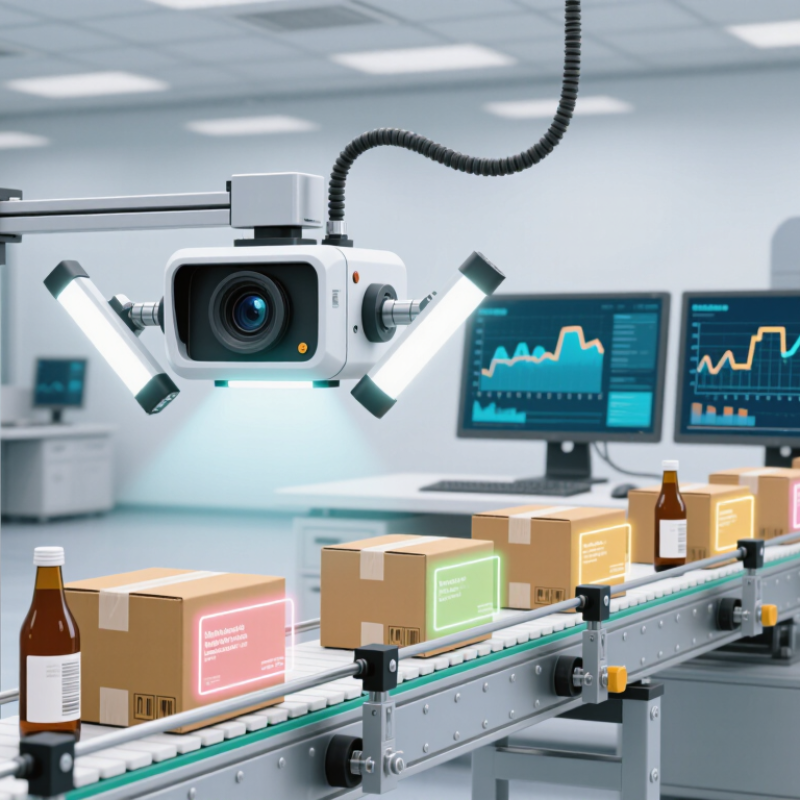
OCR inspection uses a camera and recognition software to read printed or marked text on a product, label, or package. It examines whether the expected characters are present and readable, then may compare them with a reference value. A system can also check text location, orientation, spacing, and contrast. Small details matter. A faint date code on a curved bottle, for example, may be harder to read than the same code on a flat carton.
The inspection may verify lot numbers, dates, serial codes, or short product descriptions. It can flag missing characters, incorrect sequences, blurred printing, and text that falls outside a defined area. Some systems also assess print quality, such as broken strokes or smudges. Results depend on image quality, lighting, and the range of text used to train or configure the reader. Not every mismatch is a defect; an unusual font or reflective surface can cause a false alert. Human review may still be useful when the result is uncertain.
An OCR inspection system starts with a camera, controlled lighting, and a trigger that captures each item at the right moment. Light matters. A glossy label can throw glare across a date code; a small angle change may make it readable. Image preprocessing then corrects rotation, contrast, and noise before software locates text and converts pixels into characters. The recognition engine needs settings tuned to the font, print method, and expected code length.
Next, decision software compares the reading with rules: Is the lot code present? Does the expiry date match the required format? A controller can flag a failed item, while logs retain the image and result for review. Then comes recognition. Not magic. The International Federation of Robotics reported 4,281,585 industrial robots operating in factories worldwide in 2023, a sign of how widely automated production is used. That figure does not measure OCR adoption, but it helps explain why inspection systems must fit fast production lines.
The machine-vision market, including technologies beyond OCR, was valued at USD 19.67 billion in 2024, according to Grand View Research. This broader market context matters: dependable inspection relies on more than a strong recognition score. Cameras must stay focused, lighting must remain consistent, and operators need clear failure images. A tidy dashboard can still hide weak reads. Teams should test real samples, including smudged labels and reflective packaging, then revisit settings when materials change.
Core components of an OCR inspection system, shown in typical processing order.
An OCR inspection system captures an image, prepares it for analysis, locates text, recognizes characters, checks or corrects the results, and delivers the extracted data. The step numbers indicate sequence, not measured performance.
OCR inspection turns printed or handwritten characters in an image into searchable text, then checks that text against defined rules. On a production line, a camera may capture a label as it passes under fixed lighting. Software corrects skew, reduces glare, and separates text from the background. Small details matter. One blurred digit can change a batch code. Lighting matters.
After preprocessing, recognition software identifies character shapes and arranges them into words or fields. The inspection system compares each result with an expected value, pattern, or permitted range. For example, it may check whether a date follows a set format. It can also confirm that a serial number has the expected length. Confidence scores help decide what happens next. Clear matches can pass automatically; uncertain readings can be flagged for review. That human check is useful.
Verification is not perfect reading. Fonts, curved surfaces, worn ink, and reflections can confuse recognition, even when an image looks clear to a person. Teams can improve reliability by testing real samples, including faint prints and awkward angles. They should track false accepts and missed defects, not just overall accuracy. There is room for judgment. A threshold that is too strict may reject good labels; one that is too loose may let errors through. Reviewing exceptions helps tune the process, but it cannot remove every uncertainty.
Common Applications of OCR Inspection
On packaging lines, OCR inspection checks lot codes, expiry dates, and product labels as items pass a camera. A system reads each character, then compares it with the approved text or format. It can flag a faint date on a bottle cap or a missing digit on a carton. Small marks matter. Food and beverage producers use these checks to catch print defects before cases leave the line.
In pharmaceuticals, OCR can verify text on cartons, labels, and leaflets, where a wrong strength or blurred code may create costly rework. Logistics teams use it to read shipping labels and route parcels without stopping each package for manual entry. Electronics manufacturers may inspect tiny printed identifiers on components. The MarketsandMarkets 2023 Machine Vision Market report estimated growth from $12.8 billion in 2022 to $21.3 billion by 2027; this covers machine vision broadly, not OCR alone. Grand View Research estimated the OCR market at $12.56 billion in 2023, signaling wider adoption of text-recognition tools.
Performance depends on print contrast, camera angle, surface shape, and line speed. A glossy pouch can reflect overhead lights; a curved bottle can distort letters. OCR can also accept the wrong character when fonts look alike. Human review still helps with exceptions, and inspection rules need regular testing against real production samples. A neat demo is not enough.
| Application | Text commonly inspected | How OCR inspection works | Typical checks | Purpose |
|---|---|---|---|---|
| Product packaging | Product names, ingredient statements, net quantity, and printed dates | A camera captures the package; software locates text regions, recognizes characters, and checks results against configured requirements. | Missing, unreadable, misplaced, or incorrect text | Help verify that required package information is present and legible. |
| Pharmaceutical packaging | Batch or lot numbers, expiry dates, and printed product information | The system reads printed characters and can compare variable data with an expected value or production record. | Character accuracy, print presence, readability, and data match | Support packaging checks and reduce errors in variable printed information. |
| Food and beverage production | Best-before dates, batch codes, and label text | Images are captured on the production line; OCR reads the code or text, then inspection rules check its content and position. | Absent or smudged codes, incorrect date format, and misplaced printing | Identify packaging print issues before products leave the line. |
| Mail and parcel sorting | Printed addresses, postal codes, and routing text | OCR extracts address characters from an image so that downstream systems can use the recognized text for sorting or routing. | Address readability, character recognition, and required-field presence | Help automate the processing of readable mail and parcel labels. |
| Manufactured parts | Printed serial numbers, part identifiers, and date codes | A vision system captures the marking and OCR converts the visible characters into text for comparison or traceability records. | Incorrect, incomplete, low-contrast, or unreadable identifiers | Assist identification and tracking of parts during production and inspection. |
| Forms and records | Typed or handwritten fields, form numbers, and dates | Document images are processed to locate fields and recognize text; extracted values can be checked for completeness or format. | Missing fields, unreadable entries, and values that do not match expected formats | Reduce manual data entry and help validate digitized records. |
In general, OCR inspection captures an image, prepares it for recognition, converts visible characters into machine-readable text, and checks the result against rules or expected data. Inspection performance depends on factors such as image quality, print contrast, character style, and text placement.
OCR inspection checks whether text on a product, label, or component matches an expected value. Its accuracy depends on the image before the software reads a single character. A blurred image can turn “8” into “B.” Glare from a glossy label may erase part of a number, while low contrast makes faint print difficult to separate from the background. Small changes matter.
Lighting should remain steady across the inspection area, and the camera must stay focused at the working distance. Even slight vibration on a fast-moving line can soften text. Print size, font style, spacing, and surface texture also affect results. A curved container, for example, can distort characters near its edge. Adjusting exposure or cropping may help, but aggressive image processing can remove fine strokes. That trade-off is easy to overlook.
Accuracy also depends on how the OCR system is configured and tested. Restricting recognition to expected letters or number formats can reduce misreads, but overly narrow rules may reject valid variations. Test with real samples, including faded, tilted, and partly smudged prints. Keep examples of both accepted and rejected readings. In practice, teams may trust a high accuracy score too quickly; a small batch of clean samples does not represent every shift or lighting change. Human review remains useful when a reading is uncertain.
| Cookie | Duration | Description |
|---|---|---|
| cookielawinfo-checkbox-analytics | 11 months | This cookie is set by GDPR Cookie Consent plugin. The cookie is used to store the user consent for the cookies in the category "Analytics". |
| cookielawinfo-checkbox-functional | 11 months | The cookie is set by GDPR cookie consent to record the user consent for the cookies in the category "Functional". |
| cookielawinfo-checkbox-necessary | 11 months | This cookie is set by GDPR Cookie Consent plugin. The cookies is used to store the user consent for the cookies in the category "Necessary". |
| cookielawinfo-checkbox-others | 11 months | This cookie is set by GDPR Cookie Consent plugin. The cookie is used to store the user consent for the cookies in the category "Other. |
| cookielawinfo-checkbox-performance | 11 months | This cookie is set by GDPR Cookie Consent plugin. The cookie is used to store the user consent for the cookies in the category "Performance". |
| viewed_cookie_policy | 11 months | The cookie is set by the GDPR Cookie Consent plugin and is used to store whether or not user has consented to the use of cookies. It does not store any personal data. |